On the road
Your route on the dashboard
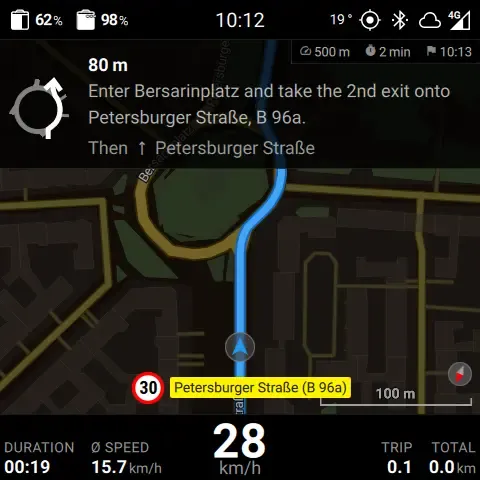
Librescoot puts maps and turn-by-turn directions on the scooter display. Maps and route calculations run on the scooter: once downloaded, navigation works without a cellular connection. Choose a 2D or 3D view and adjust your route preferences, including avoiding cobblestones.
A dashboard that suits you
Map or speedometer, light or dark theme, battery percentage or estimated range: choose what you want to see. You can also adjust the clock, brightness, and status bar. Open the menu by pulling the left brake twice.
Parking and setting off
Keycards and handlebar lock
Add and remove keycards directly on the scooter. After shutdown, the handlebar lock gives you time to position the handlebars before it engages. Hop-on/hop-off mode makes short stops easier.
Alarm and hibernation
If someone moves the parked scooter, Librescoot can respond with hazard lights and the horn. You choose how the alarm behaves. For longer breaks, set hibernation for a chosen duration or on a schedule.
Phone and browser
Librescoot supports Bluetooth control from phone apps such as stasis. You can send navigation destinations and install supported firmware updates. Librescoot’s dedicated mobile app is currently in beta testing.
USB updates are available too. Navigation, keycards, and the alarm need no SIM card.
Connect Librescoot to Sunshine for location checks, trip history, and remote access. These features require an active cellular connection on the scooter.
Install Librescoot
Librescoot replaces the firmware on the main control unit (MDB) and dashboard (DBC). The installer runs on Linux, macOS, and Windows and guides you through setup. You need a computer, a USB cable, and a PH2 Phillips screwdriver for the footwell panel. Allow about twenty minutes.
Before connecting the control units: Follow the battery disconnection instructions. Remove the main batteries first, then disconnect the Connectivity Battery, and finally the AUX battery. This order protects the electronics from damage.
Choose the Stable channel for everyday use. Testing and Nightly offer newer development builds. Downloads and the full instructions are available from the project:
Open to your ideas
Librescoot is developed by the Librescoot contributors. We at rescoot contribute code, hardware, and server infrastructure.
The software consists of individual services, mostly in Go, and a Qt/C++ interface. The lsc command-line tool lets you configure the scooter and use its functions in your own projects. Experimental dual-battery operation is also available with a hardware modification to the second battery bay.
Find the code and issues on GitHub, with technical details in the documentation and hardware reference. The community can help with questions on Discord.